Ether Personal Knowledge

One Markdown PKMS For Everything

Journal, Link Thoughts and Ideas, Manage Tasks and Projects, Publish, Own Your Data

  • Markdown + [[Wikilinks]]
  • Mobile and Desktop
  • All Platforms
  • Local + Sync
  • E2E Encryption

EtherPK is free to use for folder-based graphs. Use our Sync+ service for access to your graphs across devices, or bring your own (e.g. Git or Syncthing).

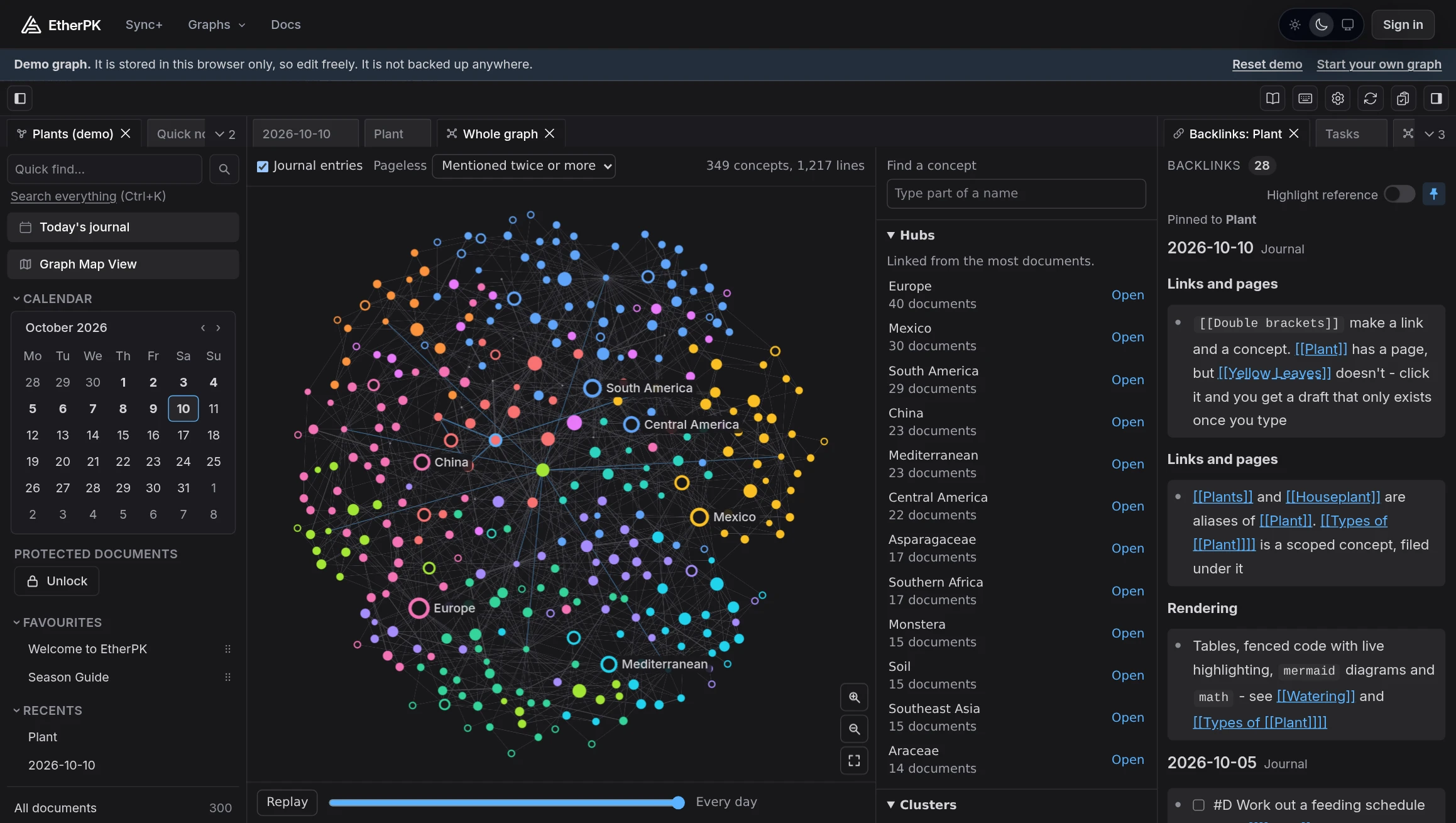
The EtherPK Client in the dark theme, showing the demo graph in the whole Graph View: each page is a dot, each wikilink a line, and each cluster of closely linked pages has its own colour, with place names drawn as rings. Beside it is the list of Hubs, and the Backlinks pane on the right lists everything that mentions the Plant page.

The Graph View: every page in the demo graph and the wikilinks between them.

EtherPK is a notes app and PKMS with a lot to offer.

  • Long-form prose and outliner features in the same documents
  • Robust wikilinking and aliasing
  • Plain local markdown files, or Sync+ with export
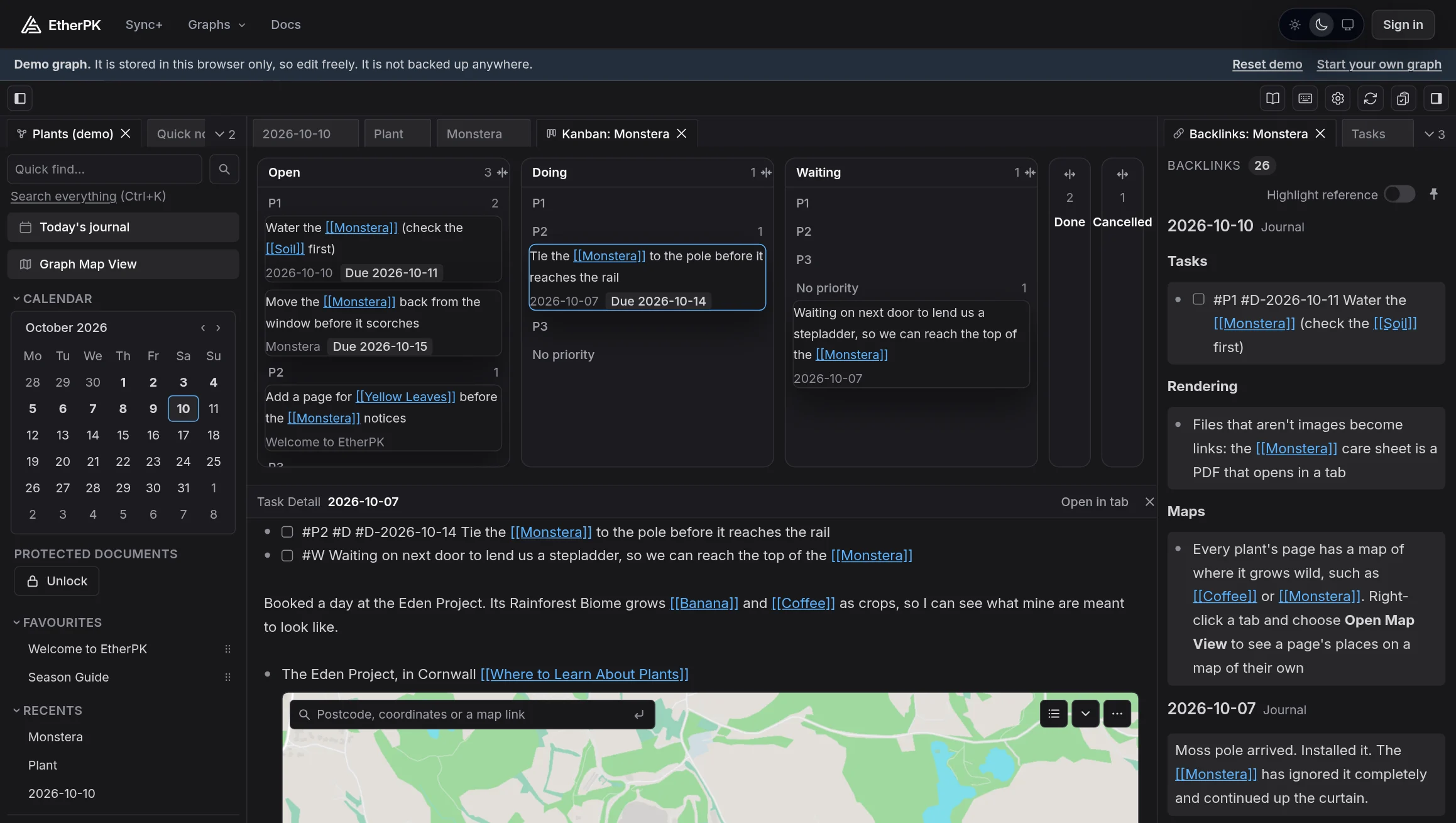
  • Task management and Kanban boards
  • Real-time collaboration
  • Quick Notes, with sharing from other apps
  • End-to-end encryption
  • Static site publishing
  • AI agent integration
  • Source-available Client

Take a quick tour of EtherPK

Journals, links, tasks, images, AI agents, sync and publishing, shown in the app in about two minutes. Narrated, with captions.

Read the transcript
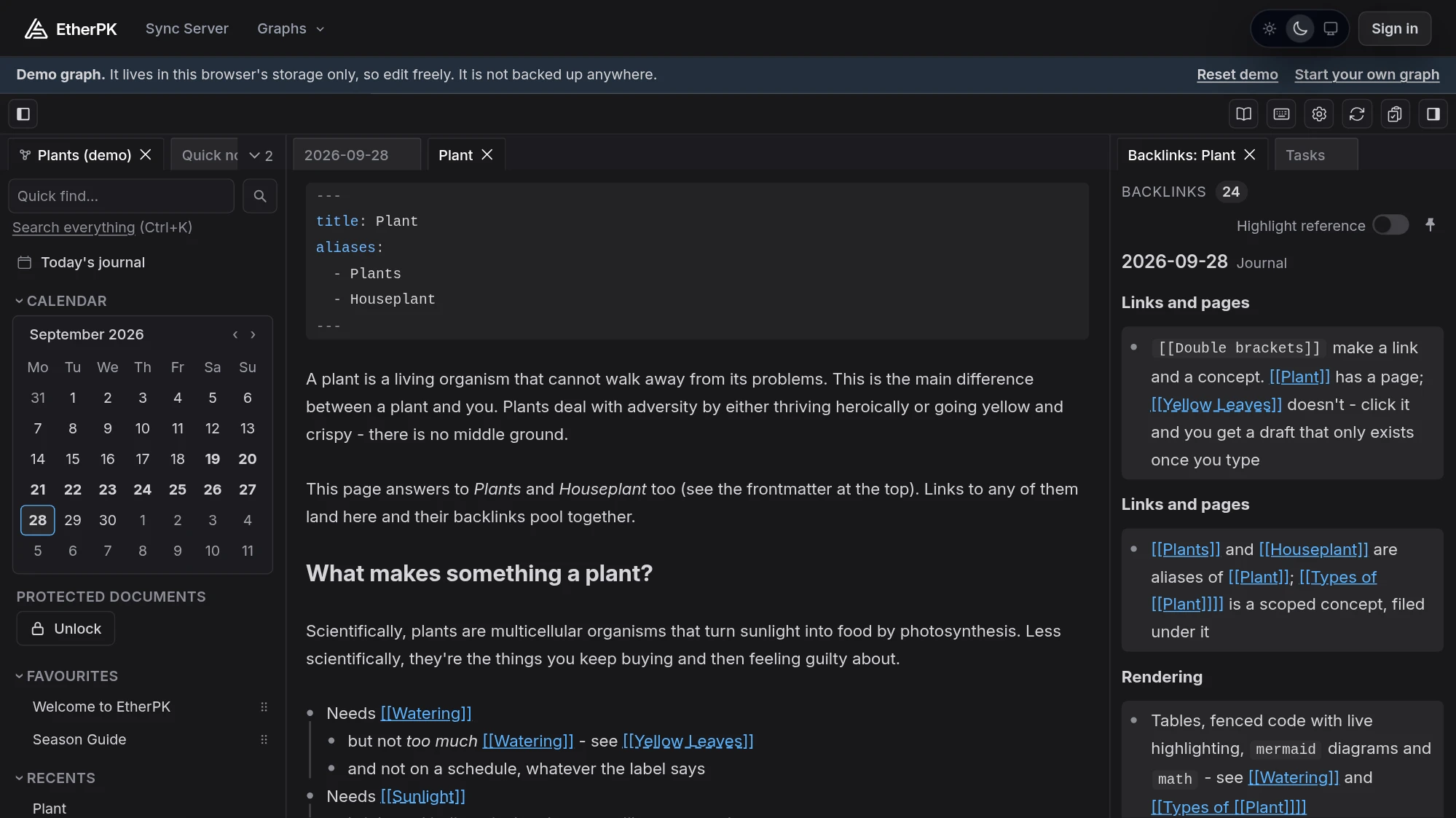
  1. The EtherPK logo, then the app on a page with a diagram, beside the same page as a markdown file, then the same notes on a laptop, a tablet and a phone. EtherPK is a personal knowledge base based on plain markdown with wikilinks, for complete data ownership, portability, and access to your notes across all of your devices.
  2. A page of plant-care notes dense with links, and a Claude Code window typing a request. It's designed for human thought and linking of concepts, with AI tooling to help you maintain, curate and search your graphs semantically.
  3. The page's outline and then its prose are picked out, a lock appears, and the page is shown as a published website. Mix outline blocks and standard prose within the same document with markdown tooling. End-to-end encryption keeps your work private by default, with static site publishing for when you want to share your ideas.
  4. A note is typed into today's journal, then a search for “gnats” finds it. Daily Journals are designed for fast information capture. Link to and write concept pages for evergreen notes. Your notes are continuously indexed for fast retrieval.
  5. A task is typed and the link menu offers Monstera after the first letters. The Monstera page opens, its backlinks list the notes that mention it, and a nested link on the page is picked out. Wikilinks: Wrap a name in double brackets to create a new concept or reference an existing one. References to the document will be shown in the backlinks view. Nested wikilinks help with categorisation.
  6. The Tasks view beside the editor, listing tasks with their priorities, statuses and due dates: two tasks are ticked off, then the Priority filter narrows the list to P1. Tasks: Track, organise and filter tasks in the task management side view, which makes EtherPK ideal for tracking project work.
  7. An image is dragged from a Pictures folder into the Upload asset dialog and appears on the Monstera page, marked end-to-end encrypted. Images and files: Upload, view and retrieve images and assets. Assets are end to end encrypted before they are uploaded.
  8. Claude Code, beside the app, is asked which plants have been overwatered, searches the notes and answers. Asked to add a task, it adds one, and the task appears in the open journal. Connect Claude Code, Codex or Cursor through EtherPK's MCP server, and they find what you wrote by meaning. Their edits appear live in your open tabs.
  9. The notes as markdown files in a folder, then on a laptop and a phone synced through Sync+ as ciphertext, and a copy exported to the laptop. Use local folder based graphs for free, or synced graphs across your devices with Sync+ and export to your local devices for backup.
  10. A note is made public from its tab and the site is built as a zip: its folder of HTML files, with the files for GitHub Pages and Cloudflare, beside the published page, above the names of four static hosts: Cloudflare Pages, GitHub Pages, Vercel and Netlify. Share your ideas: Make notes public and publish as static HTML for any static hosting provider.
  11. The EtherPK logo and etherpk.com. Try the demo at etherpk.com. No account needed.

Features at a glance

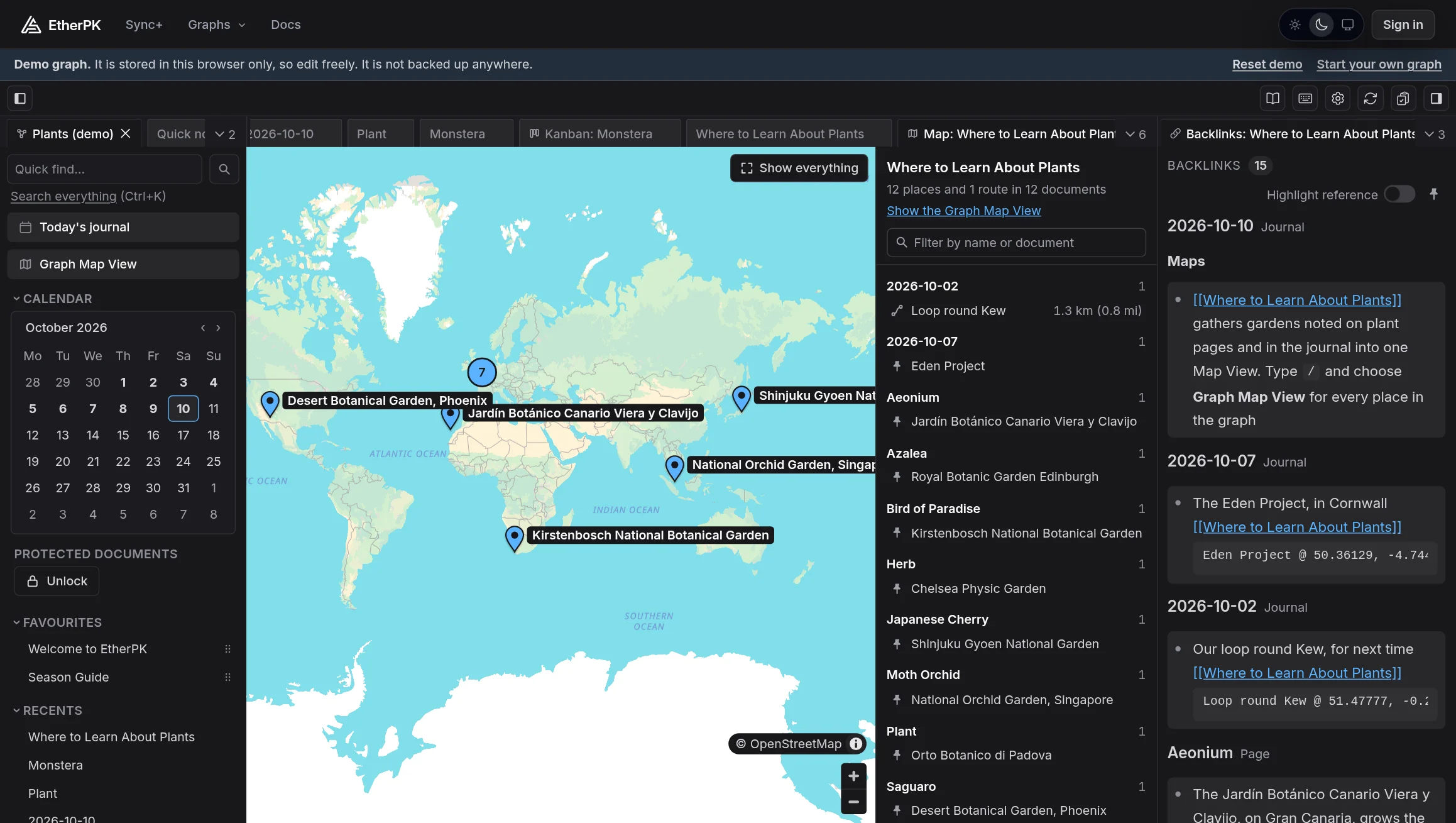
A list of EtherPK features.To get a feel for EtherPK, try the demo.

Writing

An outliner over plain markdown, not a database with an export

Structure is read from the indentation and headings in the file, so what you see is what is on disk, and the file opens unchanged in any other editor.

  • A journal entry a day, one file per day, and pages for the things that outlive a day.
  • Wikilinks that nest: [[[[Physics]] Quantum Mechanics]] names a topic within a topic and is a page in its own right.
  • Aliases, so a page answers to more than one name - names are case-insensitive, so [[physics]] and [[Physics]] are one page.
  • Backlinks on every page, grouped by the heading and bullet the link sits under, with the linking line shown in place.
  • Drafts: follow a link to a page that does not exist and you get an editable surface. Nothing is written until the first keystroke.
  • Rename rewrites every link, or keeps the old name as an alias. Renaming onto an existing name merges the two.
  • Outliner keys to indent, outdent, move and fold blocks and select whole branches.
  • Formatting by keyboard or by wrapping a selection, tables with editing commands, ==highlight==, dates by picker.
  • Code blocks with live syntax highlighting, in place rather than swapped for a preview.
  • Mermaid diagrams and KaTeX maths, inline and display, rendered over the source without changing it.
  • Frontmatter as real text: title, aliases, publishing keys and your own keys.

In the docs: Formatting Text Titles, Aliases and Frontmatter Code, Maths and Diagrams Tables

Files and images

Paste it in - the bytes are stored once

Images and files are stored beside the markdown as ordinary files, referenced from the text like any other link.

  • Images and files by paste, drag and drop or a slash command, embedded inline with a display-size hint.
  • Identical bytes stored once, however often they are added.
  • WebP conversion on upload when it saves at least a tenth, with a per-upload opt-out.
  • Links to files on your computer, with the path copied on click.
  • Orphaned-asset scan to find and delete files nothing refers to any more.

In the docs: Images and Files Links to Websites and Files

Tasks and quick notes

Tasks stay in the note that gave rise to them

A task is a markdown checkbox where you wrote it. The Tasks view collects them across the graph and ticks one off in the document that contains it.

  • Ordinary checkboxes, with priority, due, scheduled, waiting, doing and done carried as tags in the text.
  • A Tasks view across the whole graph, filtered by concept and state.
  • Quick notes: a scratch list in the sidebar for the thought you do not want to lose, filed into the journal under the day it was written.

In the docs: Tasks Quick Notes

Finding things

By name, by text, by what links where

The sidebar is a short list of ways back in, and each view remembers its reading position.

  • Search by name (a typo offers a new page instead) and by text across the graph.
  • All documents to browse, favourites shared with everyone in the graph, recents per device.
  • Back and Forward through the documents you visited, each reopening where you left it.
  • Today's journal and a calendar of the days that have an entry.

In the docs: The Graph Sidebar Search

Workspace

Lay the screen out once per graph, per device

A desktop gets tabs and panes - a phone gets a presenter with a command bar above the keyboard. Both are the same editor over the same files.

  • Tabs and panes: split, resize, dock, float and pin. Sidebars collapse rather than close.
  • A layout per graph and per device, and a keyboard shortcut per sidebar view.
  • Command menu on /, context menus on a right-click or long-press, and a shortcuts card on Ctrl+/.
  • Dark mode, a colour per graph on the toolbar, and installable as an app.
  • Several graphs side by side in one picker, local and synced.

In the docs: Tabs and Panes

Your files

A folder of markdown is a complete graph

Journals, pages, assets and a small settings folder, and nothing else. Back it up, put it in git, edit it with other tools while EtherPK has it open.

  • Import from Logseq, Obsidian, another EtherPK graph or AS Notes into a new graph, with a report of anything that could not be carried.
  • A local copy of a synced graph, kept up to date on disk as the same plain files.
  • Export any graph as a folder of markdown, any time.
  • A plain statement of what is stored where, and what ever leaves your device.

In the docs: Local Graphs Importing Where Your Data Is Stored

Sync and collaboration

Encrypted on your device before anything is sent

The Sync Server stores your content only as ciphertext, filed under ids that carry none of it: not your text, not your titles, not the graph's name, not your images. It enforces limits by counting bytes it cannot read.

  • Every device, live: real-time co-editing with collaborators' cursors. Edits made while the connection drops are kept, and merge when you are back in the order you made them.
  • Sharing by invitation, with a short key fingerprint to compare, so you know the key you share with is theirs.
  • A Recovery Code per account, stored nowhere, plus device approval, so a new device is usually let in by an existing one with a short code.
  • Phones, tablets, Safari and Firefox all work with a synced graph.

In the docs: Synced Graphs Managed Sync

Protection

For the pages nobody else should read, even with your files in hand

Sync encryption protects your notes from the service. Protection is the layer for your own machine: a stolen laptop, a shared folder, a graph you export.

  • Protected documents are encrypted with a personal key behind a passphrase or a passkey, on folder graphs as well as synced ones.
  • Locked again on a timer, or when you look away.
  • Never searched, never synced in the clear, never published, never shown to an agent.
  • No recovery: forget the passphrase and the contents are gone, by design.

In the docs: Protected Documents

Publishing

Pick the pages that are public and get a website

The docs site itself is an EtherPK graph published this way.

  • Publications: choose the public pages, group them into as many sites as you like, and write the menu as an outline.
  • A complete static site with search, a sitemap, a feed, maths, diagrams and code, into a folder or a zip, seeded for GitHub Pages and Cloudflare.
  • Themes you copy into the graph and edit in a built-in editor with a live preview, with include slots for a footer, analytics or a banner.
  • A publish report that says exactly what was and was not published.

In the docs: Publishing Your Notes as a Website Hosting a Published Site Theming a Published Site

AI agents

Agents work on the same files you do

There is no separate export for them to read and no format to translate.

  • On a folder graph, an agent reads the AGENTS.md EtherPK writes into it and works on the files directly.
  • On a synced graph, it goes through the Headless Client: a device of your account that keeps the graph in sync and serves it over MCP.
  • Semantic search by meaning, on top of search by text.
  • Protected documents stay closed to agents, whichever route they take.

In the docs: Using AI Agents with Your Notes

Running it

Managed sync, or just your own machine

The same Client in each case. What changes is where the graph is stored and who keeps it in sync.

  • Managed Sync with an EtherPK Account: sign in once and every managed app follows, with passkeys, two-factor and social sign-in, and a plan page that shows exact limits and usage.
  • The Client on your own machine, as a plain Node bundle or a Docker image, for a folder graph with no server and no account.

In the docs: Managed Sync Running EtherPK on Your Own Computer

Two ways to use EtherPK

Same editor, same format. Choose local or Sync+. We will always ensure your data is yours.

Free

Your files, your machine

Point EtherPK at a folder and your graph is a directory of markdown files and images. Back it up, put it in git, open it elsewhere. Or run the source-available Client on your own computer, with no EtherPK account or service involved.

  • The whole editor, with no limit on what you write
  • Folder graphs in a Chromium desktop browser, or the Client on your own machine
  • Run the source-available Client yourself, as a Node bundle or a Docker image
  • Join synced graphs shared with you by a Sync+ subscriber
Open The App

Sync+

Every device, end-to-end encrypted

We run the sync service for you. Your graph is encrypted on your device with keys only you hold, then synced to your phone, tablet and laptop, and to the people you choose to share it with. A live markdown copy on your disk keeps the files yours.

  • Works on phones, Safari and Firefox too
  • Share a graph and edit it together, live
  • Managed storage for images and files
  • One flat monthly price, with a free trial
Sync+ Pricing

Using EtherPK

  • Folder graphs need the File System Access API, which today means a Chromium desktop browser (Chrome, Edge, Brave). Phones, Safari and Firefox work with synced graphs.
  • End-to-end encryption protects your data and privacy. An unlocked device or your Recovery Code is needed to decrypt your synced notes. We cannot decrypt or recover your notes for you. Keep a copy of your code safe and backed up.

Start with today's journal

Open EtherPK, choose a folder, and write the day. When something in it deserves a page of its own, wrap the words in double brackets and follow the link.

Need support? Email us at mail@appsoftware.com.

© 2026 App Software Ltd. All rights reserved.

EtherPK is operated by App Software Ltd, a company registered in England and Wales (company number 07109450). Registered office: 1 Derwent Business Centre, Clarke Street, Derby, Derbyshire, England, DE1 2BU. VAT number GB 129 7967 57.